Spectra Ventura 150/200T Connect and Non-Auto Watermaker Maintenance
Spectra Ventura 150 and 200 Maintenance Guide (Connect and Deluxe)
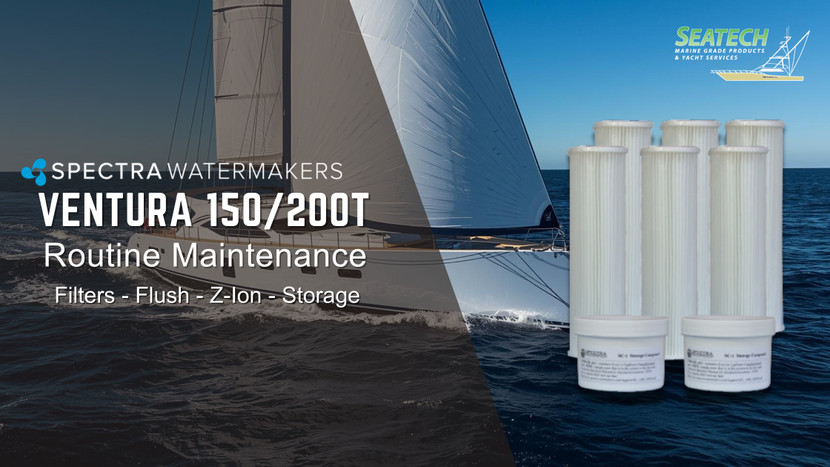
This guide is written for Spectra Ventura 150 and Ventura 200T owners (both Spectra Connect and manual/remote manual controls). It focuses on the maintenance items that most directly affect reliability: fresh water flushing, prefilters, charcoal flush filter, and (optionally) Z-Ion membrane protection.
At a glance: Ventura 150 vs Ventura 200T
- Ventura 150: designed for broad operating conditions and efficient daily use.
- Ventura 200T: higher output in warm water (tropical) conditions. If you are routinely below ~50°F / 10°C, the 200T may not perform as intended.
What changes between Automated and Non-Automated units?
- Connect/automated: automates run cycles, flushing, and storage logic (Auto Store timers, reminders, dashboards). With a tank switch, it can fill-and-stop automatically, then flush and return to Auto Store.
- Deluxe/ non-auto/ Manual / Remote Manual: you control run/stop and you must be consistent about flushing and storage. The maintenance items are the same, but the routine depends more on the operator.
1) The maintenance schedule that prevents 90% of problems
Ventura systems are happiest when they are either (a) run regularly, or (b) properly flushed and protected during idle time. The goal is simple: do not leave seawater sitting in the membrane and filters.
| When | What to do | Why it matters |
|---|---|---|
| After each use | Fresh water flush (Connect: automated at shutdown; Manual: run your flush procedure). | Removes saltwater, reduces corrosion, and dramatically slows biological growth. |
| When output drops or pressures rise | Change prefilters (5 micron is the day-to-day standard (sometimes the only filter); 20 micron is useful for dirtier intake conditions). | Plugged prefilters starve the Clark Pump, increase wear, and can cause shutdowns or poor production. |
| Every 6 months (typical) | Replace the charcoal flush filter. | Charcoal removes chlorine from dock water flush supplies. Chlorine can damage RO membranes if not removed. |
| If you will not run the unit within the allowed idle window | Use Auto Store (Connect) or preservative / winterizing procedure (Manual). | Prevents biofouling, protects the membrane, and avoids expensive recovery cleaning. |
2) Parts you will need to replace (with quick links)
These are the highest-frequency consumables on Ventura 150/200 systems. Keep spares onboard if applicable.
| Category | Item | Seatech link | Notes |
|---|---|---|---|
| Prefilters | 5 micron element (FT-FTC-5) | FT-FTC-5 | Your primary “daily use” filter element. |
| Prefilters | 20 micron element (FT-FTC-20) | FT-FTC-20 | Useful when intake conditions are dirtier than open-ocean water. |
| Flush water | Charcoal filter (FT-FTC-CC) | FT-FTC-CC | Removes chlorine from flush supply. Replace on interval (often ~6 months) or if chlorine breakthrough is suspected. |
| Spare bundles | Cruise Kit A (KIT-BCK-A) | KIT-BCK-A | Good starter spare pack for cruising. For units with a 5 Micron Pre-filter. |
| Spare bundles | Cruise Kit B (KIT-BCK-B) | KIT-BCK-B | Good starter spare pack for cruising. For units with a 5 & 20 Micron Pre-filter. |
| Storage | SC-1 preservative (KIT-CHEM-SC1) | KIT-CHEM-SC1 | Used when storing beyond the allowed idle time or when Auto Store is not practical. |
| Winterizing | Propylene glycol (KIT-CHE-IPG) | KIT-CHE-IPG | Freeze protection and long-term microbial protection when mixed to the correct concentration per the manual. |
Looking for the complete Ventura system pages? Ventura 150 | Ventura 200T
3) Connect-specific: Auto Store, flush timing, and why it matters
Auto Store is your best friend when you will not run the system daily. On many Ventura automated systems, a single Auto Store action initiates a fresh water flush and then schedules repeating flush cycles. The key rules are:
- Continuous power is required for Auto Store timers to keep flushing on schedule.
- Verify your boat has enough water capacity - automated flush cycles consume freshwater (your manual specifies the approximate amount per interval).
- If you press Stop during operation, understand whether your configuration will still flush or will stop without flushing (follow your controller prompts and manual).
Pro tip: optimize flush duration once a year
Flush settings are often factory-defaulted. Optimizing flush duration means using the least freshwater while still fully purging saltwater. Refer to manual for more information.
4) Z-Ion deep dive (less pickling, longer idle windows)
Z-Ion is designed to keep Ventura membranes and filters ready to operate during idle time by introducing silver/copper ions into the system during the fresh water flush cycle. Those ions collect in the filters and membrane surfaces, discouraging biological growth. The practical benefit: idle storage windows can be extended (when used correctly), reducing how often you need to pickle with chemicals (reduces the need to flush water flush up to 30 days).
What Z-Ion changes in day-to-day operation
- You still fresh water flush after each use. Z-Ion is not a substitute for flushing - it is a protection layer added to flushing.
- Z-Ion typically reduces the need for frequent short-term storage routines because the protection lasts significantly longer than a plain flush (reduces the need to flush water flush up to 30 days).
- Charcoal filtration remains important because flush water may contain chlorine (dock water). The charcoal filter is still a normal replacement item.
Z-Ion models and common replacement parts (quick links)
| Item | Seatech link | When you care |
|---|---|---|
| Z-Ion for manual systems (ZION-MAN) | ZION-MAN | Adding Z-Ion to a manual/remote manual platform. |
| Z-Ion for automated systems (ZION-AUTO) | ZION-AUTO | Adding Z-Ion to an automated controller platform. |
| Z-Ion rod assembly (SUB-ZION-RA) | SUB-ZION-RA | Typical wear item if ion production is reduced or service indication appears. |
| Z-Ion generator bowl (SUB-ZION-ELECTB) | SUB-ZION-ELECTB | Replace if bowl is damaged or leaking, or during certain service procedures. |
How Z-Ion works (simple explanation)
- Flush water is pulled from your vessel’s fresh water supply.
- It passes through the charcoal filter to remove chlorine.
- During the flush, the Z-Ion generates a controlled stream of ions that distribute through the watermaker’s wet surfaces.
- Those ions help suppress microbial growth so the system stays ready between uses.
5) When to pickle, winterize, or clean the membrane
If you are going to exceed your safe idle window (or your system has been left unused and you are unsure of the internal condition), follow the long-term storage procedure for your controller type. In general, Spectra storage and maintenance chemistry breaks down like this:
| Chemical / process | Purpose | When used |
|---|---|---|
| SC-1 preservative | Long-term storage protection (microbial control) | When you will not be able to flush/run within your allowed idle window. |
| Propylene glycol | Winterizing (freeze protection) + microbial protection at correct concentration | Cold climates or extended layup where freezing is possible. |
| SC-2 / SC-3 cleaners | Membrane cleaning (type depends on fouling) | Only when needed - typically after confirming performance via a flow test and troubleshooting intake/filter issues first. |
Shop all Spectra cleaning and storage chemicals here: Spectra Cleaning / Storage Chemicals
6) Quick troubleshooting map (symptom to first checks)(refer to manual for more info)
| Symptom | First checks | Most common fix |
|---|---|---|
| Low product flow | Prefilter condition, intake restrictions, air leaks on suction side | Replace prefilters, correct intake restriction, re-prime/purge air |
| High pressure alarms / unstable pressure | Prefilters, feed pump behavior, proper priming | Prefilter replacement and priming corrections |
| Poor water quality (high salinity) | Confirm calibration (if applicable), verify diversion valve behavior, check flush effectiveness | Correct calibration/settings, confirm proper flush duration, then investigate membrane condition if needed |
Need help choosing parts?
Recent Posts
-

SeaStar Hydraulic Steering Spring Checklist | Fluid, Seal Kits & Bleeding
Get Your SeaStar Hydraulic Steering Ready for Spring If your boat has been sitting through the winte …11th Mar 2026 -
Sleipner (Side-Power) Thrusters: The Complete Guide to Bow & Stern Thrusters, Controls, and Installation
Updated: February 2026 The Complete Guide to Sleipner Bow & Stern Thrusters (Side‑Power): Choosing …26th Feb 2026 -
3 Essentials for Upgrading Your Old Engine Controls (Plus a Quick System Selector)
3 Essentials for Upgrading to the NHK MEC KE System (and How to Pick the Right One) If your boat st …17th Feb 2026